

Home Cuori Solitario Picche FreeCell Cribbage Yahtzee Gin Rummy Altri giochi

Here you will see how to change your ad blocker settings to allow ads on CardGames.io. We have instructions for two of the most popular ad blockers, AdBlock Plus and AdBlock. If you're not sure which one you have, just look at the images, and see which icon in the toolbar looks most like your toolbar icon. The images are from the Chrome browser, but Internet Explorer, Edge, Firefox and Safari all have similar toolbar icons for the ad blockers.

AdBlock Plus

This is the most popular ad blocker, and it's very easy to turn it off for one site.

1. Click on the AdBlock Plus icon in the upper right corner of your browser. On some browsers the icon might be to the left of the address bar instead, but it will look similar.
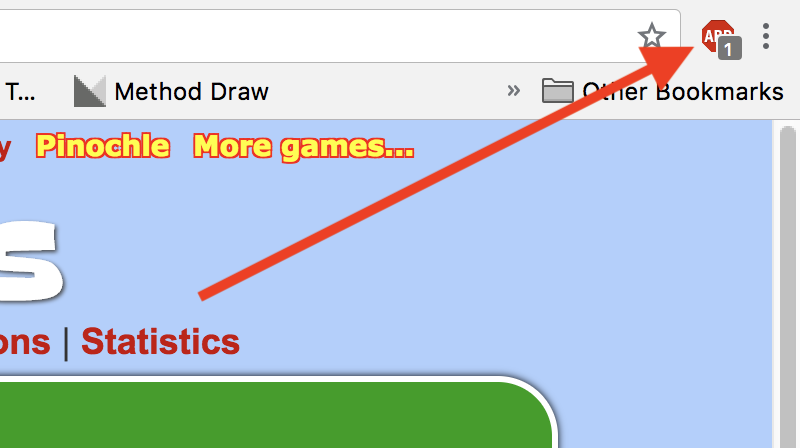
2. Click on the text "Enabled on this site", which is shown with a red box around it in the picture below.
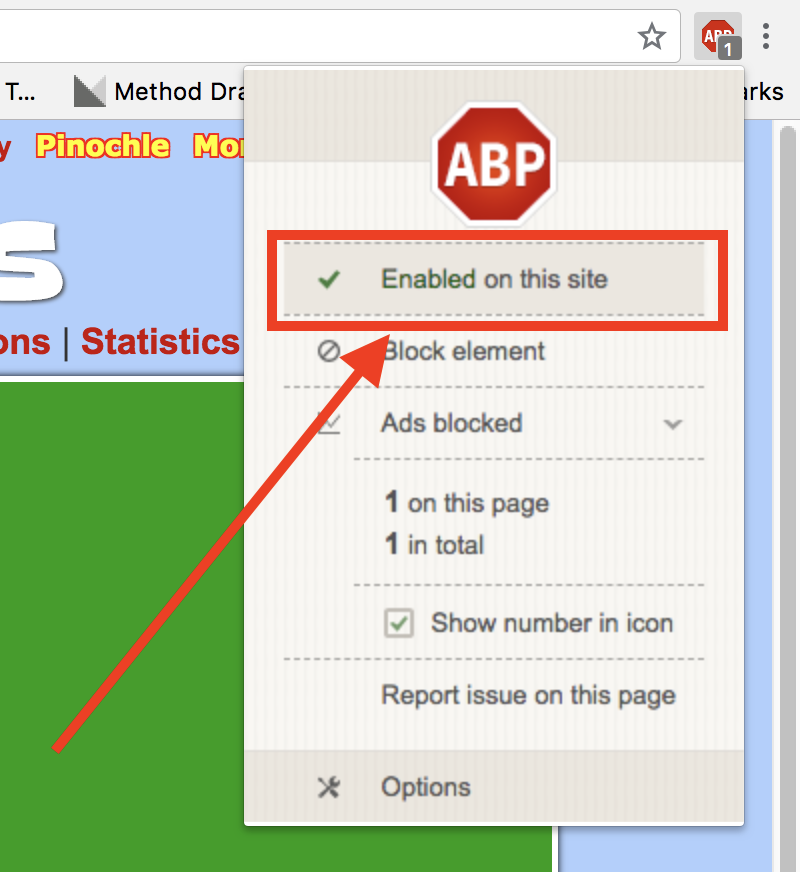
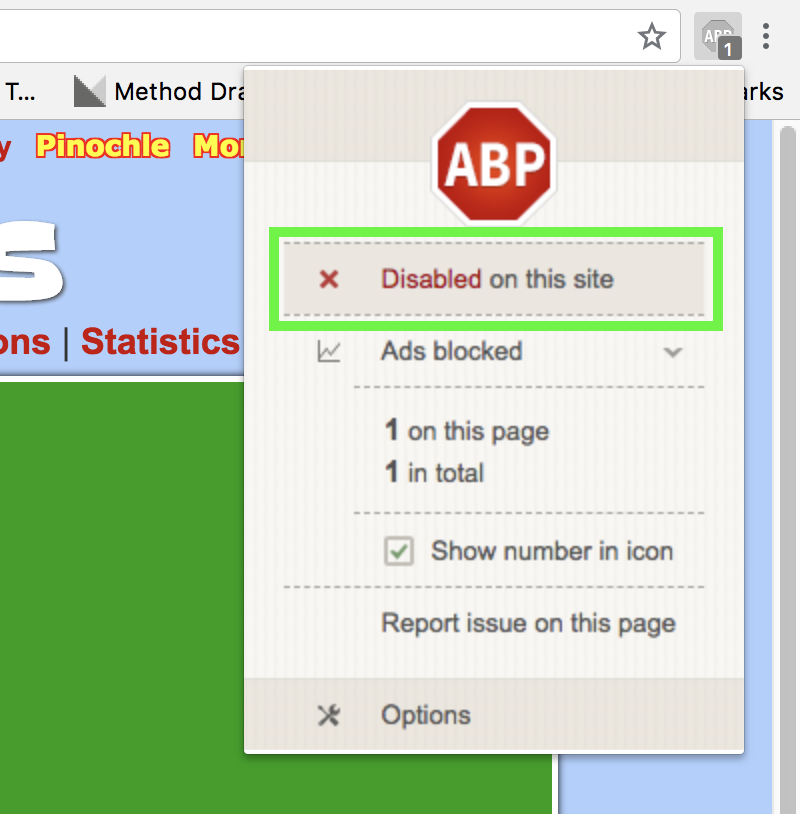
3. After you click it that text should say "Disabled on this site". That's it, you're done. Thank you, we appreciate you turning your blocker off!
AdBlock

This is another very popular blocker. It's a bit more complicated for this one, but not too bad.

1. Click on the AdBlock icon in the upper right corner of your browser. On some browsers the icon might be to the left of the address bar instead, but it will look similar.
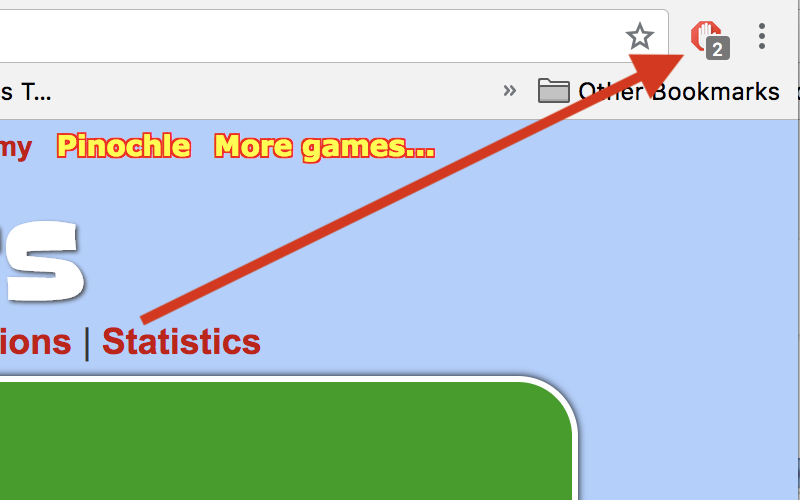
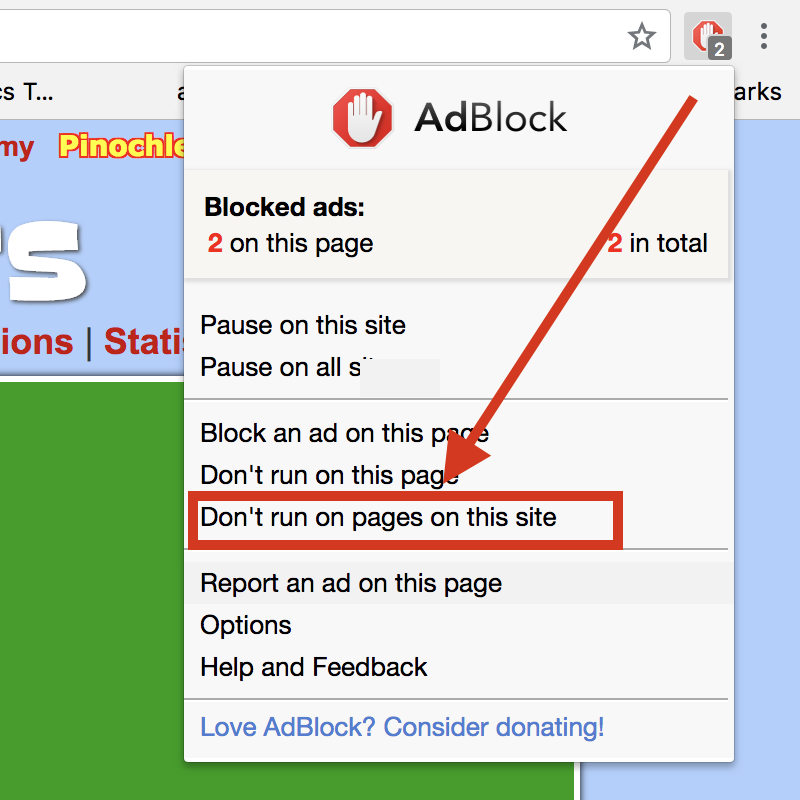
2. Click on the text "Don't run on pages this site", which is shown with a red box around it in the picture below. On some browsers that text might be "Don't run on pages on this domain" instead.
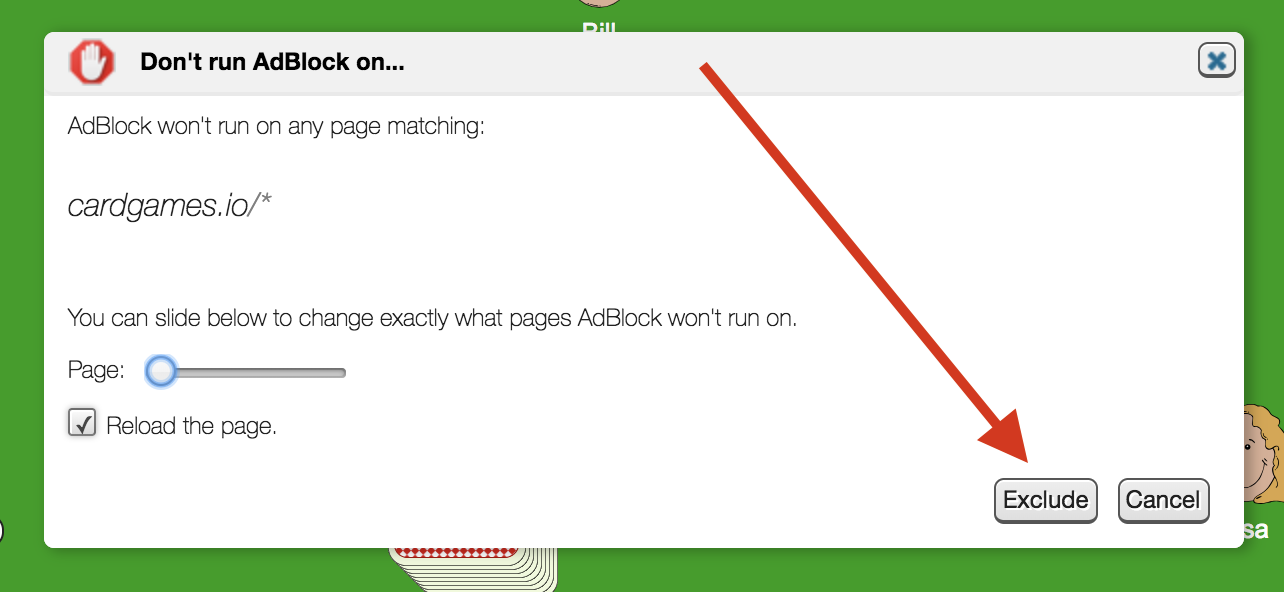
3. Then you get this dialog. Don't change any options there, just click on the "Exclude" button, which the arrow points to in the image below. That's it, you're done. Thank you, we appreciate you turning your blocker off!
Ora abbiamo un'app!


We've created a new CardGames.io app for your tabletphone! Tutti i giochi del sito, in modalità schermo intero, con più personaggi! Vuoi scaricare l'app?

Welcome to the Matrix.

root@cardgames.io:
Buona Giornata di Star Wars! Che il 4 maggio sia con te!

Non ti piace Star Wars? Clicca qui per disattivare il tema. Oppure vieni nel nostro gruppo della community su Facebook e raccontaci tutto.

Buon Halloween! Non ti piace il tema di Halloween? Clicca qui per disattivare il tema. Oppure vieni nel nostro gruppo della community su Facebook e raccontaci tutto.
Buona Festa dell'Indipendenza! Non ti piace il tema del 4 luglio? Clicca qui per disattivare il tema. Oppure vieni nel nostro gruppo della community su Facebook e raccontaci tutto.. Vuoi solo eliminare i fuochi d'artificio? Premi qui per fermarli
Buona Pasqua! Non ti piace il tema di Pasqua? Clicca qui per disattivare il tema. Oppure vieni nel nostro gruppo della community su Facebook e raccontaci tutto.
Buon Ringraziamento! Non ti piace il tema del Ringraziamento? Clicca qui per disattivare il tema. Oppure vieni nel nostro gruppo della community su Facebook e raccontaci tutto.
Non ti piace il tema natalizio? Clicca qui per disattivare il tema. Oppure vieni nel nostro gruppo della community su Facebook e raccontaci tutto.
Non ti piace il tema di Capodanno? Clicca qui per disattivare il tema. Vuoi solo eliminare i fuochi d'artificio? Premi qui per fermarli. Puoi anche venire nel nostro gruppo della community su Facebook e raccontaci tutto.
Forza squadra! Non ti piace il tema della Coppa del Mondo? Clicca qui per disattivare il tema.
Vuoi solo eliminare i fuochi d'artificio? Premi qui per fermarli.
Puoi anche venire nel nostro gruppo della community su Facebook e raccontaci tutto.